Lesson 8
Boosting Your Productivity
18 min
Summarize, plan, brainstorm and organize information into tables.
Definition
Productivity is the ability to accomplish what matters while spending as little time and effort as possible. With ChatGPT, this means delegating sorting, summarizing, and organizing tasks so you can save your energy for the decisions that truly matter.
Being productive does not mean always doing more: it means doing the right things, in the right order, without getting distracted. ChatGPT can help you achieve this, provided you know what you are using it for and remain in control of important decisions.
Saving Time on Repetitive Tasks
Beyond writing, ChatGPT is particularly useful for organizing, sorting, and structuring information. Here are some of the most valuable everyday uses.
A task is a good candidate for ChatGPT when it is repetitive , involves working with text, and produces a result that can easily be checked. On the other hand, important decisions and situations involving your responsibility should remain in your hands.
To identify these tasks, observe your week and write down the activities you frequently repeat: replying to similar messages, cleaning up notes, preparing lists, summarizing documents, or comparing options. Each of these activities can be completed faster with a well-written prompt that you can reuse whenever necessary.
- Good candidate : a task that comes up frequently, involves text, and whose result can be checked in a few minutes.
- Requires caution : a task involving exact numbers, recent facts, or precise references, because ChatGPT can make mistakes.
- Keep it in your hands : important decisions, sensitive topics, and anything involving your responsibility or reputation.
Summarizing a Long Text
Paste an article, meeting report, or lesson, and specify the format of the summary you want.
Summarize this text in 5 key points, followed by one final
sentence explaining the main idea.
[paste your text here]
You can adjust the summary with instructions such asfor a beginner,keeping the numbersorin no more than 100 words.
You can also ask ChatGPT to focus only on information relevant to you: actions to take, dates to remember, or details that affect your situation. A summary tailored to your needs is often much more useful than a general summary.
Read this message and tell me only: what is expected of me,
the deadline, and the documents I need to prepare.
[paste your text here]
Organizing Your Time
I have a presentation to prepare for Friday and I have
1 hour available each weekday evening. Suggest a day-by-day
schedule with one specific task for each evening.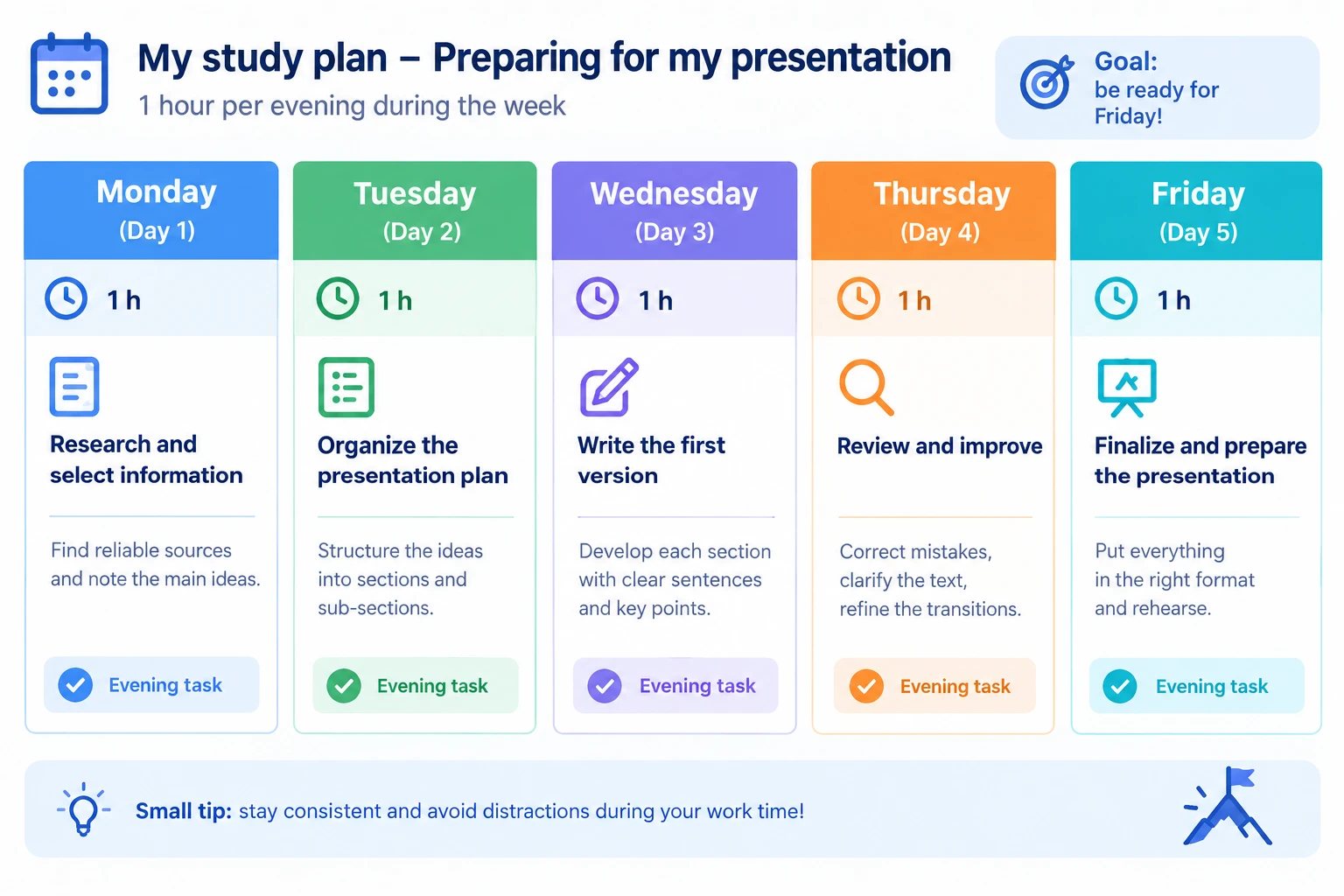
A good schedule takes reality into account. Specify your fixed commitments (classes, work, commuting), the times when you are most focused, and how much time you actually have available. Also leave room for unexpected events: a schedule where every minute is occupied is almost always impossible to follow.
Here are my constraints: classes from 8 a.m. to 4 p.m., a one-hour commute, and I am more productive in the morning.
I have a report due in 6 days. Suggest a schedule with breaks
and a half-day safety margin before the deadline.
Prioritizing Your Tasks
When everything seems urgent, ChatGPT can help you organize what needs to be done. List your tasks, specify your constraints, and request a priority order with an explanation:
Here are my tasks for the week: submit an assignment (Thursday), study for an exam (next Monday), reply to 3 emails, organize my desk.
Rank them by priority and explain your choice in one sentence for each.
To better understand the reasoning, you can also request a classification based on two criteria: urgency (what needs to be done soon) and importance (what has the greatest consequences). Tasks that are both urgent and important come first, followed by important but non-urgent tasks, which should be scheduled before they become urgent.
Classify these tasks in a table using two criteria: urgent or not, important or not.
Then suggest the order in which I should complete them.
[paste your task list here]
Breaking a Large Project Into Small Steps
A large project can often seem impossible to start. Ask ChatGPT to break it into short, concrete steps that you can complete one at a time. Each small achievement helps you move forward and stay motivated.
I need to write a 10-page report in 2 weeks.
Break the work into small steps lasting 30 to 45 minutes,
in the order I should complete them.
Brainstorming Ideas
When you feel stuck, ask for many ideas at once, then sort through them yourself. Keep only the ones that appeal to you.
Give me 15 ideas for group projects in a computer science
class, ranked from the simplest to the most ambitious.
Brainstorming works best in two stages. First, ask for a large number of ideas without judging them. Then choose two or three possibilities and ask ChatGPT to develop them: steps, potential difficulties, and required materials. This way, you move from a blank page to the beginning of a concrete project.
Presenting Information in a Table
Comparisons are much easier to read in a table. Simply ask for one explicitly.
Compare three study methods (study sheets, quizzes, mind maps)
in a table with the following columns: advantages, disadvantages,
time required.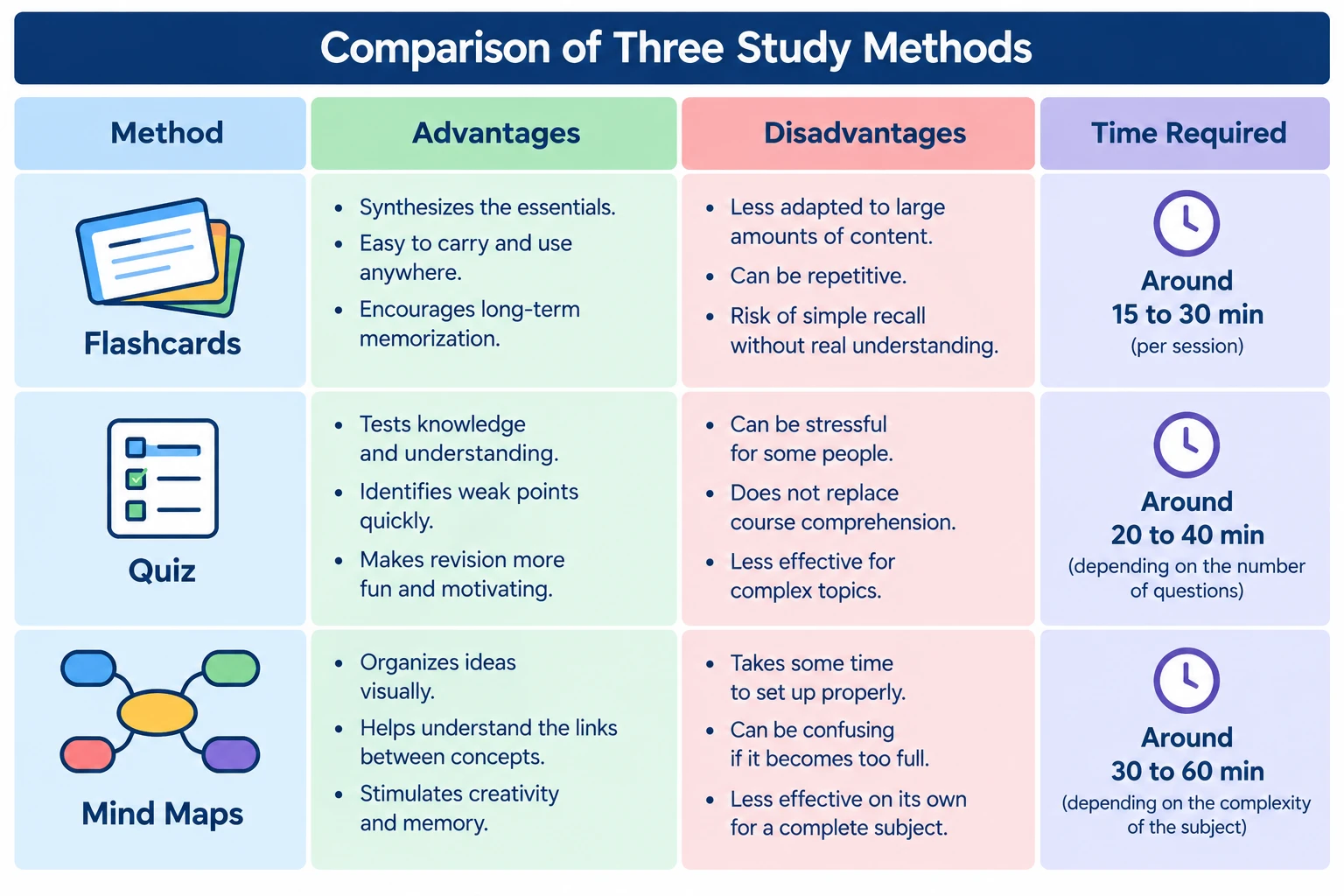
Tables are particularly useful when making choices: comparing tools, offers, or different approaches. Specify the criteria that matter to you (price, duration, difficulty, quality) and request a reasoned recommendation at the end, which you can then discuss or challenge.
Preparing for a Situation
You can also practice for an interview, an oral presentation, or a difficult conversation. Ask ChatGPT to play the role of the other person.
Act as a recruiter. Ask me one interview question at a time
for a computer science internship, then give me feedback
on each of my answers.
To make the practice useful, request honest and specific feedback after each answer: what was clear, what was missing, and what you could say differently. You can repeat the exercise as many times as necessary until you feel comfortable, without the pressure of a real situation.
Turning Notes Into a Well-Structured Document
After a meeting or class, your notes are often disorganized. ChatGPT can organize them in just a few seconds:
Here are my meeting notes: [paste your notes here]
Turn them into a clear meeting report with three sections:
decisions made, tasks to complete (with the person responsible), and the next deadline.
Pay particular attention to names, dates, and task assignments: these are the most sensitive parts of a meeting report and can cause problems if they are incorrect. If something seems doubtful, check your original notes.
Preparing a Checklist
For a trip, a move, or an event, request a checklist that you can tick off as you go:
I am going on a 3-day business trip for an internship.
Prepare a checklist with checkboxes, organized into categories:
documents, clothing, and work equipment.
Then adapt the list to your situation: ChatGPT provides a starting point, but only you know what you really need. Feel free to writeAdd any items I may have forgottento complete it.
Preparing for a Meeting or Appointment
Before a meeting, a discussion with a teacher, or an important appointment, a few minutes of preparation can save a lot of time. ChatGPT can help you clarify your objective, list the points to discuss, and anticipate questions:
I need to present my project's progress to my supervisor in 10 minutes.
Help me prepare a 4-point agenda and anticipate
three questions they might ask me.
Sorting and Processing Your Messages
When you receive many messages, ask ChatGPT to help you sort them and prepare quick replies. Paste a long message and ask it to extract the essential information, then suggest a short response that you can adjust:
Here is an email I received: [paste the message here]
Explain in two lines what is being asked of me and how urgent it is,
then suggest a short and polite reply.
Always review the response before sending it, and remove personal or confidential information from the original message before pasting it.
An Example of a Day With ChatGPT
- In the morning : request a daily schedule based on your tasks and available time.
- During the day : summarize a long document or rephrase a message before sending it.
- In the evening : turn your notes into a report and prepare the next day's task list.
This routine takes only a few minutes at each stage, but it gives structure to your day. With practice, you can keep using the same prompts and change only the day's information: your schedule can then be prepared in less than a minute.
Focusing on One Task at a Time
Productivity also depends on your ability to focus. When you have several tasks on your mind, ask ChatGPT to help you choose just one and define a very simple first step. Starting small is often the best way to get moving. You can also ask it to suggest short sessions, such as 25 minutes of work followed by a 5-minute break, adapted to your schedule.
I have three things to do tonight and I am struggling to get started.
Help me choose the most important one, then suggest
a first 10-minute step to get started.
Reviewing Your Week
A regular review helps you understand what works and what needs adjustment. Give ChatGPT a list of what you planned and what you actually completed, then ask it to help you see things more clearly:
Here is what I planned to do this week: [list] and what I actually completed: [list].
Help me understand what slowed me down and suggest three simple adjustments
for next week.
Good Habits for Staying Efficient
- Provide realistic constraints : available time, deadlines, and equipment to get a realistic result.
- Request a specific format : list, table, or checklist, depending on how you want to use the result, for example
in checklist format. - Reuse your best prompts : save the ones that work well in a document so you do not have to rewrite them.
- Check before using : review summaries and schedules before relying on them.
- Start small : automate just one repetitive task first, then expand the habit once it works.
- Remain the decision-maker : ChatGPT makes suggestions, but you choose and take responsibility.
Good to Know
A schedule generated by ChatGPT is only a starting point. It does not know about unexpected events or your actual pace: adapt it to your life rather than following it exactly.
Saving time should not mean sacrificing quality. Use the minutes you save for what matters: reviewing, thinking, and resting.
Mistakes to Avoid
- Following an unrealistic schedule : without specifying your available time, you may end up with a plan that is impossible to follow.
- Summarizing without checking the original text : a summary may leave out an essential detail or distort another.
- Pasting sensitive data : avoid sharing confidential information, even to save time.
- Trying to automate everything : some tasks can be completed manually faster than it takes to write the prompt.
- Getting lost in adjustments : spending hours perfecting a prompt is not productive. A good-enough result obtained quickly is often better.
Key Takeaways
ChatGPT helps you save time by summarizing , organizing , prioritizing , and comparing . Always provide your real constraints, request a clear format, and stay in control of the final result.
- Delegate repetitive tasks that are easy to verify.
- Specify your constraints and the desired format .
- Break down large projects into small steps.
- Review and adjust every summary or schedule before relying on it.
Exercise
Go Further