Lesson 7
Writing, Rephrasing and Translating
18 min
Write messages, proofread your texts, change tone and translate with nuance.
Definition
Assisted writing means using ChatGPT to produce, correct, or improve a text based on your ideas. Contextual translation goes beyond word-for-word translation: it adapts the message to the desired language, audience, and tone.
In both cases, ChatGPT does not replace your own thinking: it helps you express what you want to say more quickly and clearly, while leaving you with the final decision about what will actually be sent.
An Everyday Writing Assistant
Writing an email, a job application, or a delicate message can take time. ChatGPT helps you overcome the blank page, rephrase an awkward sentence, or adjust the tone. The principle remains the same: you provide the context, it suggests a draft, and then you improve it.
Always consider the resulting text a draft , not a final version. You are the one who knows your recipient, your situation, and what you really want to say. ChatGPT saves time, but the final decision is yours.
There are many situations where it is particularly useful: replying to a message that makes you uncomfortable, writing an official letter when you are unfamiliar with formal expressions, preparing a personal introduction, rephrasing a text that is too long or confusing, or simply finding the first words to get started. In each of these cases, it helps you overcome the blank page, which is often the hardest part.
- Write : produce a first draft from a few ideas or simple notes.
- Correct : identify spelling, grammar, and punctuation mistakes.
- Rephrase : express the same idea more clearly or in a different tone.
- Summarize : shorten a long text while keeping the essential information.
- Translate : convert text from one language to another while respecting the context.
Writing a Message From Your Ideas
Write a short, polite email to my teacher asking
for a 3-day extension on my assignment because I was sick.
Use a respectful tone and a maximum of 100 words.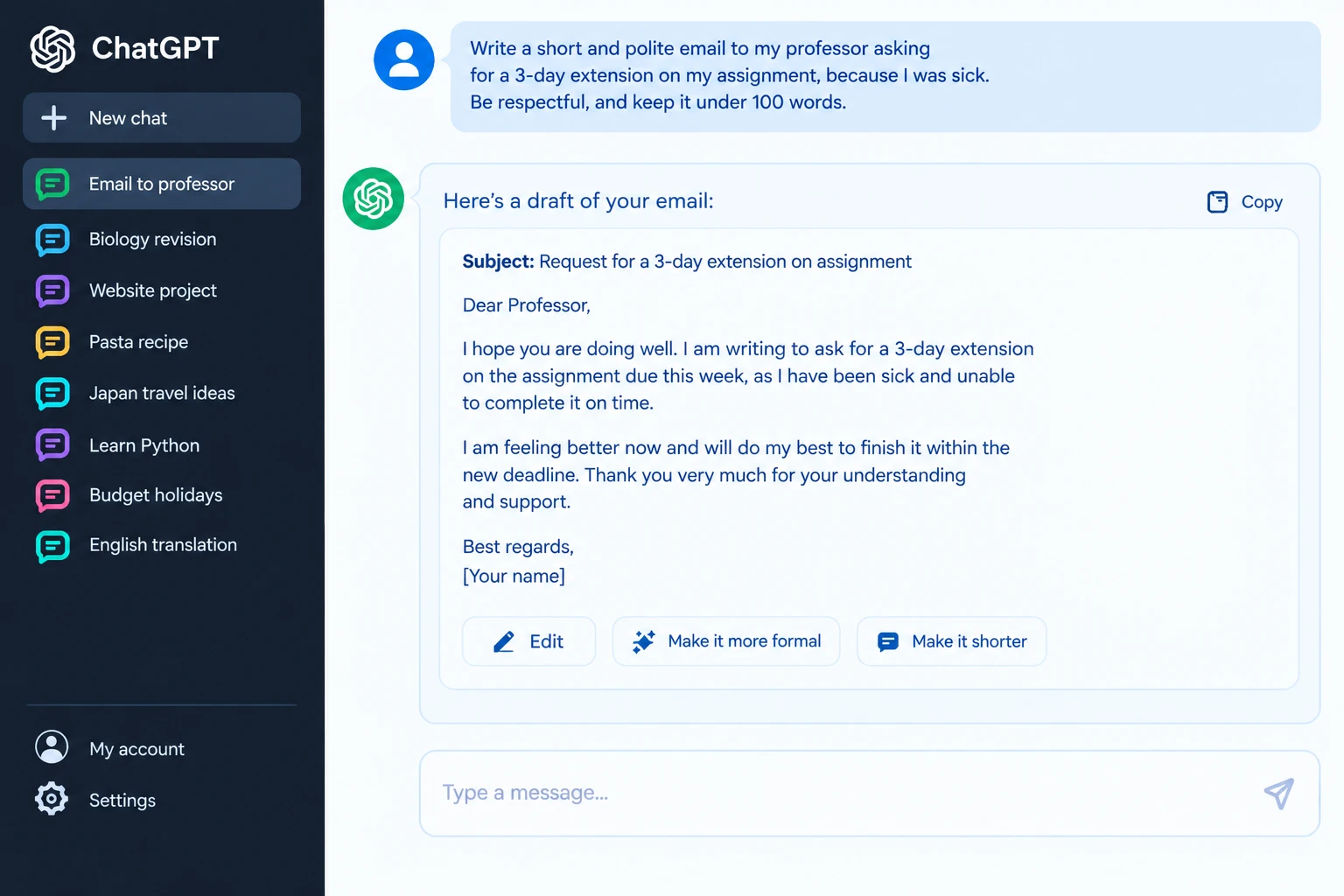
This prompt works well because it includes the recipient (my teacher), the reason, the length (maximum 100 words), and the tone (respectful). The more useful information you provide, the fewer changes you will need to make.
You can also start with rough notes. If you do not yet know how to structure your message, write down the important points as they come to mind, then ask ChatGPT to turn them into a structured message:
Here are my notes: meeting moved to Friday at 10 a.m., room B, bring the report, inform Marc.
Turn them into a clear and friendly message for my team.
Writing Different Types of Text
The same method applies to many types of everyday writing. Here are a few examples of requests to inspire you:
- A thank-you message : explain what you are thanking the person for and how close you are to them.
- A complaint : provide the facts, the date, and what you are requesting, using a firm but polite tone.
- A meeting report : provide your notes and request a structured version including decisions and tasks to complete.
- A personal introduction : provide a few details about your background and goals, and specify the context (professional profile, website, or social network).
- A social media post : specify the topic, target audience, and desired length.
Correcting and Rephrasing Your Text
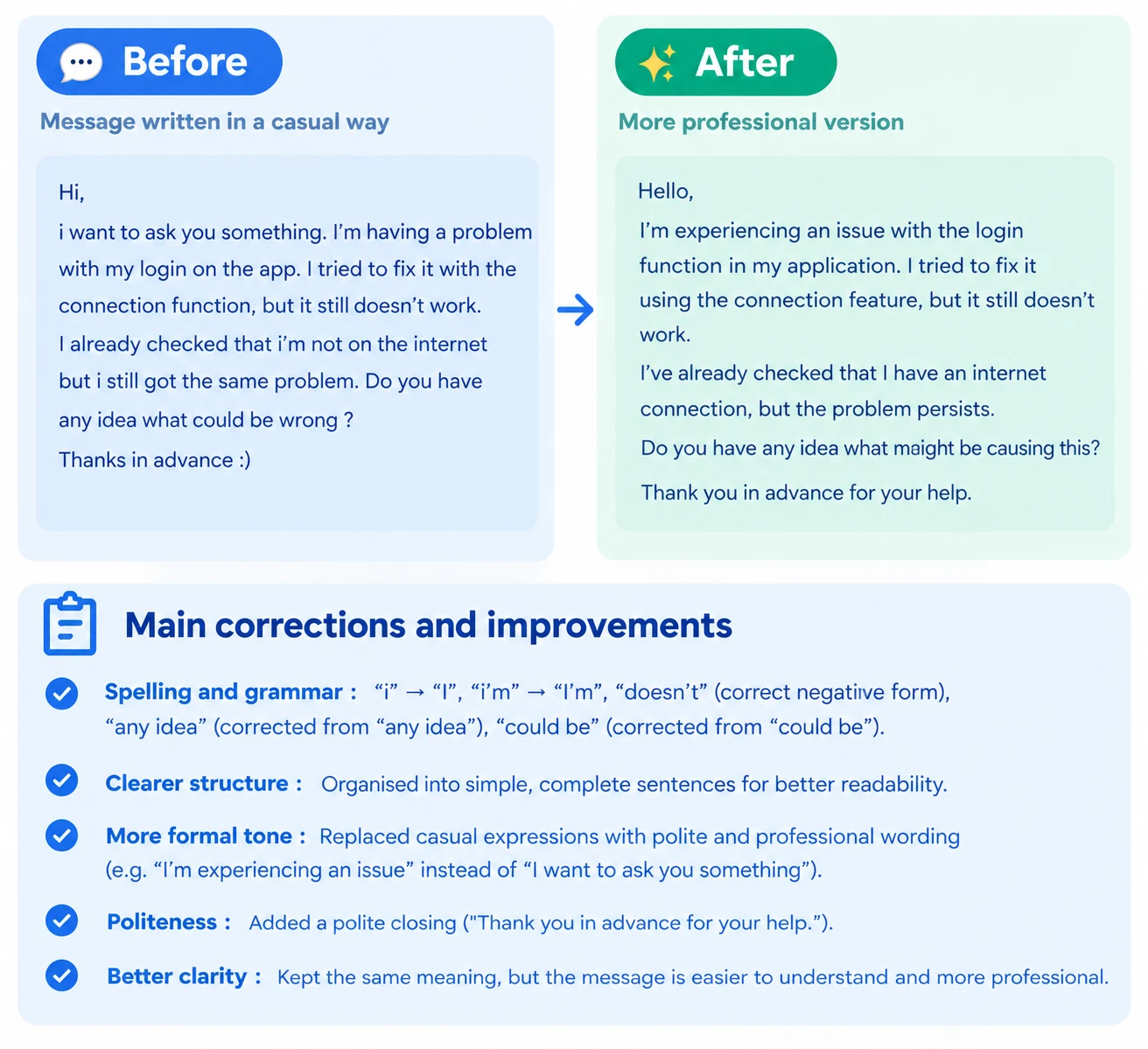
Paste your own text and specify what you want: a simple correction of mistakes, a clearer version, or a change of tone.
Correct the spelling and grammar of this text without
changing my writing style. Then explain the main
corrections you made.
[paste your text here]Rewrite this message in a more professional tone,
while keeping exactly the same meaning.
[paste your message here]The instruction "without changing my writing style" is important: without it, ChatGPT may completely rewrite your text when you only wanted to correct a few mistakes. Similarly, asking for a list of corrections helps you understand your mistakes and improve, instead of simply receiving a corrected text.
Choosing the Right Language Register
Register refers to the level of formality used in a text. Depending on the situation, you can ask ChatGPT to adopt one of the following styles:
- Formal : for an email to a teacher, an administration, or an employer. For example, request a
formal and courteous tone. - Neutral : for a clear and simple message, suitable for most situations.
- Informal : for a message to a friend or close colleague, using a
casual tone.
If you are unsure which register to choose, ask for advice directly:What tone is most appropriate when writing to a recruiter?ChatGPT will explain the differences and suggest a version in each style so you can compare them.
To understand the difference, here is the same request expressed in two different registers. You can ask ChatGPT to create both versions from your original idea, then choose the one that best suits your recipient:
Formal: Dear Sir or Madam, I am writing to ask whether it would be possible to reschedule our appointment on Tuesday.
Informal: Hi! Could we move our appointment on Tuesday to another time?
Summarizing and Shortening a Text
ChatGPT can also condense a long message or document so you can keep the essential information. Specify the desired length and target audience:
Summarize this text in no more than 5 lines for someone
who does not have time to read it in full.
Keep the important dates and decisions.
[paste your text here]
Always specify what must be preserved (dates, numbers, names, and decisions): a summary that is too short may remove exactly the information you need. Then compare it with the original text to make sure nothing essential is missing.
Preparing a Job Application or Cover Letter
For a job application, do not ask ChatGPT to invent your background. Give it your real information and ask it to organize it:
Help me write the beginning of a cover letter for an accounting internship.
Here are my strengths: reliable, comfortable using Excel, and some experience in a nonprofit organization.
Use a motivated and sincere tone, maximum 6 lines.
Then review the draft and replace overly general expressions with examples from your own experience. A recruiter can quickly recognize a generic text that does not reflect a real person.
You can also use ChatGPT to improve your writing without letting it write for you: paste your own letter and ask it to identify unclear passages, repetitions, or sentences that are too long. This way, you keep your text while benefiting from an outside perspective.
Review my cover letter below as a recruiter would.
Identify three areas for improvement without rewriting the text for me.
[paste your letter here]
Translating With Context in Mind
ChatGPT can translate effectively, and more importantly, it can adapt the translation to the situation. Therefore, specify the audience and register (formal or informal).
Translate this message into English for a professional contact,
using a polite and natural tone. Also suggest a more
casual version.
[paste your message here]
To check an important translation, you can askTranslate this text back into Frenchand compare it with your original message: if the meaning has changed, that is a sign that something needs to be corrected.
A good translation is not just about replacing words: it takes expressions, politeness conventions, and context into account. An expression that is very common in French may sound strange or overly formal in another language. Do not hesitate to ask for additional explanations:
Explain why you chose these polite expressions in the translation,
and tell me whether there is a more natural expression for an English-speaking reader.
Translating a Received Message to Understand It
Translation is not only useful for writing: it also helps you understand a message received in a language you do not know well. Paste the text and request a translation with explanations of ambiguous passages or idiomatic expressions:
Translate this message into French, then explain any expressions
that do not have a literal meaning and the sender's overall tone.
[paste the message here]
You can then ask ChatGPT to help you write a reply in the same language, maintaining the same level of politeness. Always review the result carefully, especially if the message concerns a contract, an official procedure, or an important matter.
Improving a Text Through Several Messages
You will get better results by making small, gradual improvements rather than expecting a perfect text on the first attempt. Here are some useful follow-up requests:
Shorten this message by half.
Replace the second sentence with something warmer.
Suggest three other ways to start the email.
Each adjustment builds on the previous text, thanks to the conversation context. Keep all the work in the same conversation as long as you are working on the same message, and start a new one when moving to another text.
Writing a Delicate Message
Some messages are difficult to write: a refusal, a disagreement, a follow-up, or bad news. In these situations, ChatGPT can help you find the right balance between honesty and politeness. Explain the situation, what you want to achieve, and what you want to avoid:
I need to politely decline an invitation to a group project because I do not have enough time.
Write a clear and respectful message in 4 sentences
that is neither cold nor overly apologetic.
Then ask for two or three variations (more direct, warmer, shorter) and choose the one that best matches your relationship with the person. Only you know how direct you can be with them.
Creating a Reusable Message Template
If you often write the same type of message (appointment requests, follow-ups, customer replies), ask ChatGPT to create a template with placeholders. You will only need to replace the information in brackets each time you send it:
Create a polite payment reminder email template for an unpaid invoice.
Put the information to fill in between brackets
(name, date, amount) and keep it under 80 words.
Adapting a Text to Its Audience
The same content is not written in the same way for a child, a colleague, a customer, or an examination panel. When you already have a text, ask ChatGPT to adapt it for a different reader without changing its core meaning:
Rewrite this paragraph so that a 10-year-old student can understand it,
using short sentences and an everyday example.
[paste your text here]
This technique is very useful for explaining a concept in simple terms, preparing a message for several people, or simplifying an overly technical document.
Make a habit of saving your best writing prompts in a notes file: you can reuse and adapt them in just a few seconds.
Mistakes to Avoid
- Sending without proofreading : an incorrect name or date can go unnoticed in an otherwise well-written text.
- Forgetting the context : without a recipient or objective, the draft will be too general, for example
Write an email. - Delegating everything : if you no longer recognize your writing style, rewrite certain sentences in your own words.
- Accepting a translation without checking it : a misunderstanding can appear in a sentence that otherwise seems correct.
- Requesting a very long text all at once : it is better to work section by section to maintain control.
Keeping Your Voice and Proofreading
- Always proofread before sending: check names, dates, and numbers, which the model may invent or distort.
- Personalize : add a personal detail so the text reflects who you are.
- Stay honest : generated text does not replace what you genuinely think, especially in a cover letter.
A simple tip for keeping your own voice is to read the text aloud. If a sentence sounds artificial or you would never say it that way to the person concerned, it probably does not sound like you. Rewrite it in your own words, or ask ChatGPT for a simpler, more natural version.
Good to Know
Avoid pasting confidential information (customer data, internal documents, medical or banking information) into your prompts. Replace such details with fictional names or remove them.
If your school or company has rules regarding the use of AI, follow them and, when required, mention that you used a writing assistance tool.
Key Takeaways
- Give ChatGPT the desired recipient , tone , and length .
- Treat every response as a draft that needs proofreading and personalization.
- For translation, specify the audience and register .
- Work through small adjustments rather than expecting a perfect text immediately.
- Always check names, dates, and numbers before sending anything.
Exercise
Go Further